Map scale: turn centimetres into distance
A map distance needs a scale and a clearly defined path. Work through two conversions, compare an imaginary route with a straight line, and spot the trap in an enlarged map.
Start with one centimetre
On a map marked 1:25,000, one unit on the map represents 25,000 of the same units on the ground. Choose centimetres: 1 cm represents 25,000 cm, which is 250 m. The two sides of the ratio must use the same unit.
Once you know the distance represented by 1 cm, multiply by the length you measured. These paper-map calculations assume the map is printed at its stated scale. A ruler held against this webpage is not a reliable way to use its illustrations.
The same 3.6 cm can mean different distances
At 1:25,000, a line measuring 3.6 cm represents 3.6 × 250 m = 900 m, or 0.9 km.
At 1:50,000, 1 cm represents 500 m. A line measuring the same 3.6 cm now represents 3.6 × 500 m = 1,800 m, or 1.8 km.
The larger denominator means more ground distance fits into the same space on paper. Before multiplying, check the scale on the particular map you are using.
Decide which line you are measuring
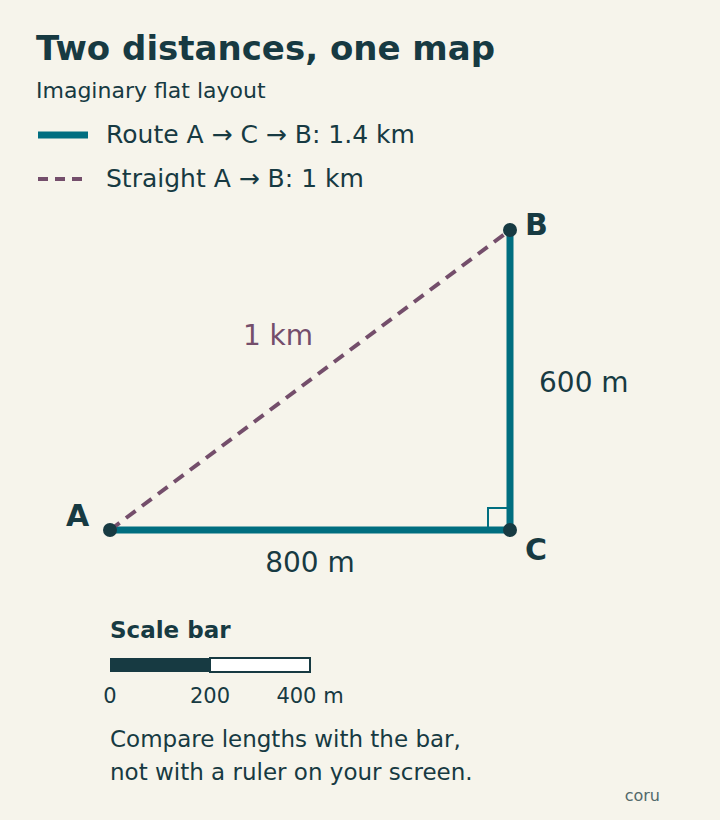
Imagine a flat training diagram with three points. From A to C is 800 m; from C to B is 600 m. The two legs meet at a right angle. Following A → C → B gives 800 + 600 = 1,400 m, or 1.4 km.
The straight line from A to B is 1,000 m in this example. It is 400 m shorter, but it is not the distance along the two-leg route. This is invented geometry, not a navigable route or a claim that a shortcut exists.
On a winding route, follow the bends rather than measuring only the gap between its ends. On paper, you can lay thin string along the line, then straighten it and compare it with the scale bar. Treat the result as an estimate: small bends and the accuracy of your tracing matter.
On a real topographic map, a scale measurement estimates horizontal distance, not the length over slopes. Map accuracy and projection also limit the estimate.
Use the bar when the image changes size
A scale bar is a drawn length labelled with a distance. Compare the line you want to measure with that bar in the same image. If the line is 1.8 times the length of a 500 m bar, it represents 900 m. You do not need to know the physical size of a screen pixel.
If a map and its scale bar are enlarged or reduced together by the same proportion in both directions, their length relationship stays the same. A printed numeric label such as 1:25,000 does not automatically change with them.
For example, a 4 cm line on a correctly printed 1:25,000 map represents 1 km. Enlarge the whole image to 150%: the line is now 6 cm long, but it still represents 1 km. Applying the unchanged ratio to that new paper measurement would give an incorrect 1.5 km.
This only works when the map and bar stay together and resize uniformly. Stretching an image more horizontally than vertically changes shapes and distances differently; one bar cannot repair that. On an interactive digital map, use the scale shown at the current zoom level.
Check 1: convert the distance
Choose an answer, then open the answer explanations to compare your calculation. The worked conversions above remain available without JavaScript.
Answers and explanations
- 90 m: One centimetre represents 250 m, so 3.6 cm must represent more than 250 m.
- 900 m: 3.6 × 250 m = 900 m.
- 1.8 km: That would be the answer at 1:50,000. Here the scale is 1:25,000.
Check 2: follow the stated route
Use the two labelled legs in the imaginary example. The answer explanations are also available without JavaScript.
Answers and explanations
- 1 km: That is the straight-line distance in this diagram; the stated route goes through C.
- 1.4 km: The route uses both legs: 800 m + 600 m = 1,400 m = 1.4 km.
- 200 m: Subtracting the legs does not give the distance travelled along them.
Check 3: inspect an enlarged map
Assume the whole map and its bar were enlarged uniformly to 150%, with no cropping or stretching. Open the explanations to check each option.
Answers and explanations
- The unchanged 1:25,000 label with a ruler: The paper lengths changed but the label did not. The original numeric ratio no longer describes the enlarged print.
- The scale bar enlarged together with the map: The bar and map lengths increased by the same factor, so their relationship is preserved.
- Neither: enlargement always destroys the scale bar: Uniform enlargement of the map and its bar preserves their length relationship.
A quick check before measuring
- Find the scale that belongs to this map at this size or zoom.
- Choose the exact path: a straight line or a route with bends.
- Keep units consistent, and convert the final result to metres or kilometres.
- For a resized image, prefer its accompanying scale bar; reject a distorted image for this exercise.